2019年9月17日星期二

VXDIAG Multi Tool Connection via USB, LAN and WiFi

This is VXDIAG multi tool connection guide.
VXDIAG Hardware Connection have three connection mode :
USB Connection
LAN Connection
WiFi Connection
VXDIAG USB/LAN Connection
Connect OBDII cable to the vehicle 16pin diagnostic port, and USB/LAN cable to the computer.

VXDIAG-Multi-Tool-Connection-Guide-1
After device boot complete, the power led will flash, and the buzzer will prompt.
Install USB driver for Windows 7/8/8.1/10
The first time to connect USB cable to the computer, Windows will prompt [Installing device driver] . Windows automatically complete driver installation.
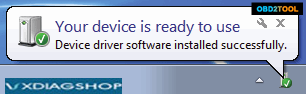
VXDIAG-Multi-Tool-Connection-Guide-2
Install USB Driver for Windows xp
The first time to connect USB cable to the computer, Windows will prompt [Found New Hardware]
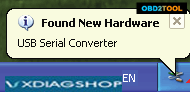
VXDIAG-Multi-Tool-Connection-Guide-3
Please follow these steps to complete USB driver installation.
1. Select [No, not this time], then click [Next]
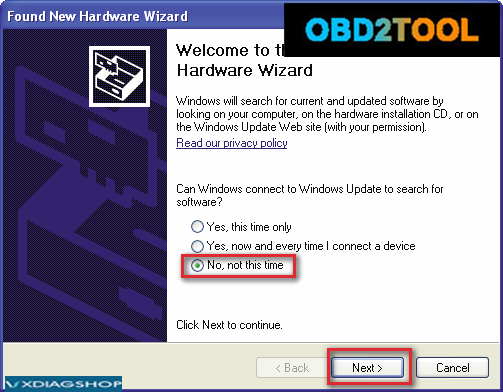
VXDIAG-Multi-Tool-Connection-Guide-4
2. Select [Install Driver Automatically], then click [Next]
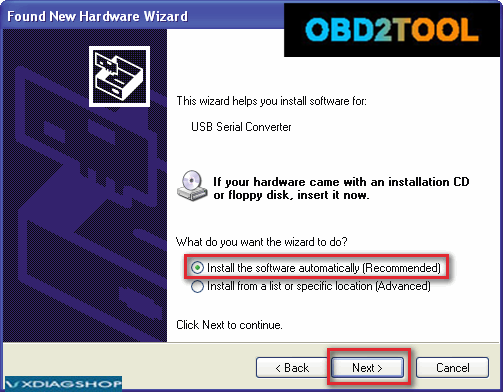
VXDIAG-Multi-Tool-Connection-Guide-5
3. Please wait while the wizard installs the software
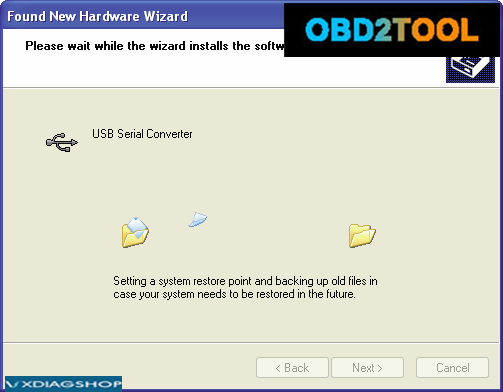
VXDIAG-Multi-Tool-Connection-Guide-6
4. Complete Found New Hardware Wizard, click [Finish]
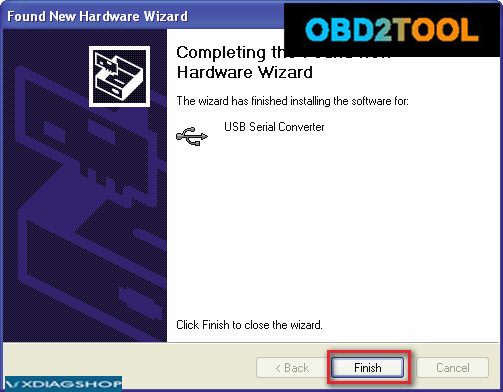
VXDIAG-Multi-Tool-Connection-Guide-7
5. Thereafter, it will pop up the second time [Found New Hardware Wizard], same as above.
6. The USB Driver installed completed
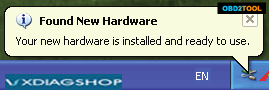
VXDIAG-Multi-Tool-Connection-Guide-8
After USB driver is successfully installed, PC LED will flashing.
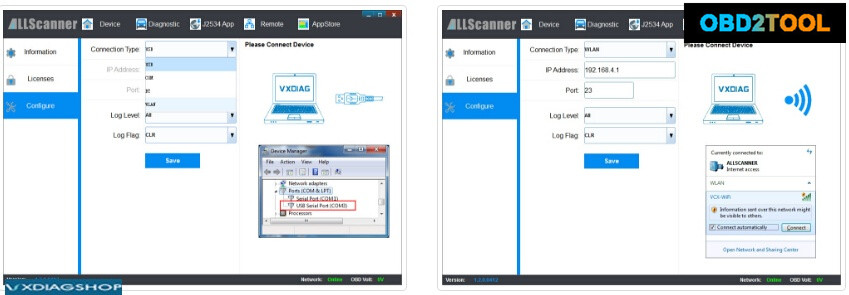
7. Start VX Manager program,select [Device],then click [Configure], Connection Type select [Auto],click [Save],Restart VX Manager program?
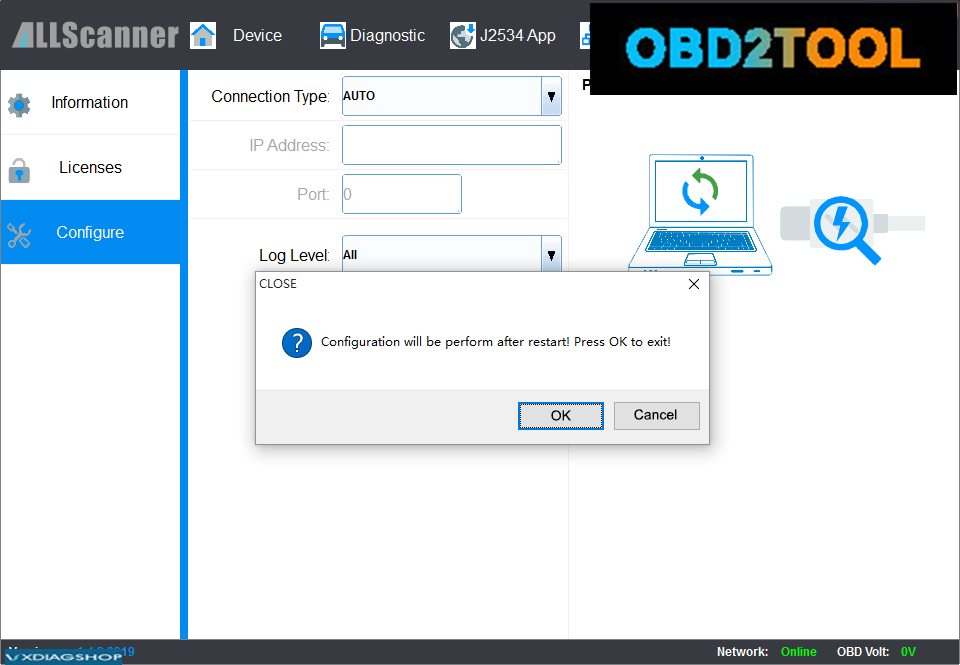
VXDIAG-Multi-Tool-Connection-Guide-9
Please make sure the device is connected.
Run VX Manager, The information of device will be displayed in “Device Manager”.
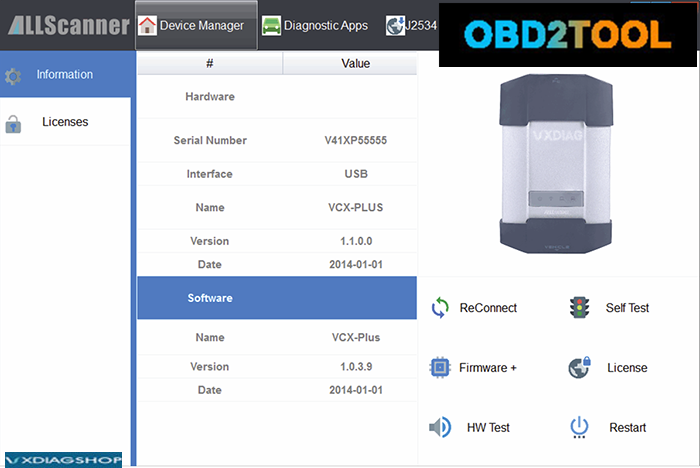
VXDIAG-Multi-Tool-Connection-Guide-10
VXDIAG WiFi Connection
Connect OBDII cable to the vehicle 16pin diagnostic port, and computer connect to the device through WiFi.

VXDIAG-Multi-Tool-Connection-Guide-11
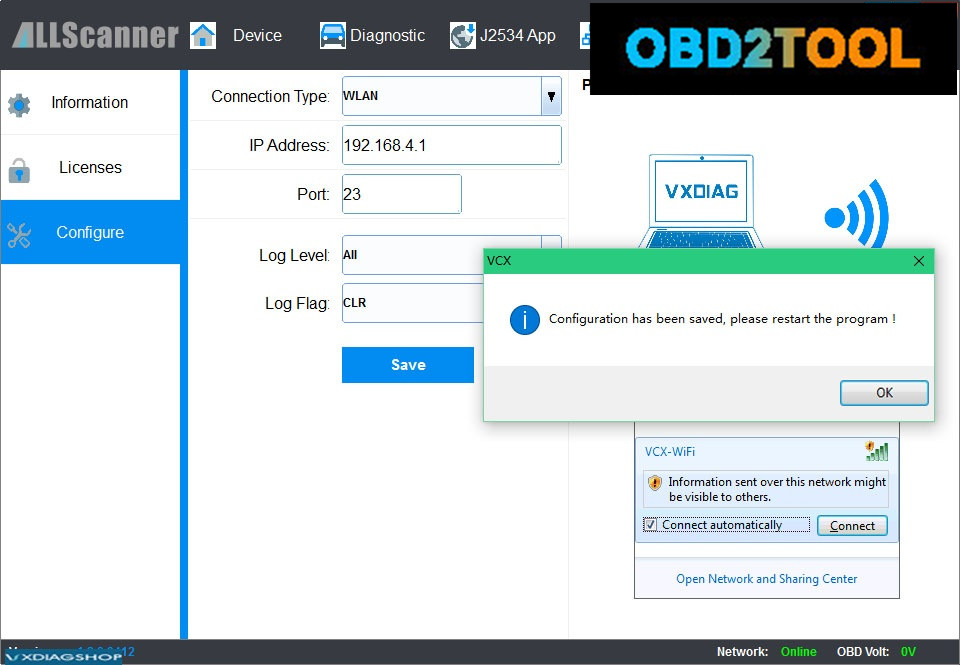
1.Click VCX-WiFi, and check [Connect automatically] ,then click [Connect]
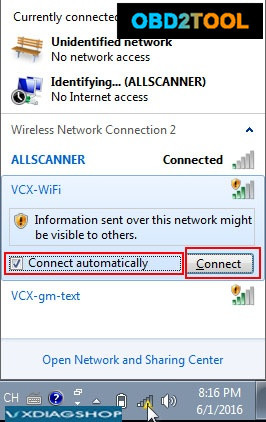
VXDIAG-Multi-Tool-Connection-Guide-12
2.Setting obtain an IP address automatically
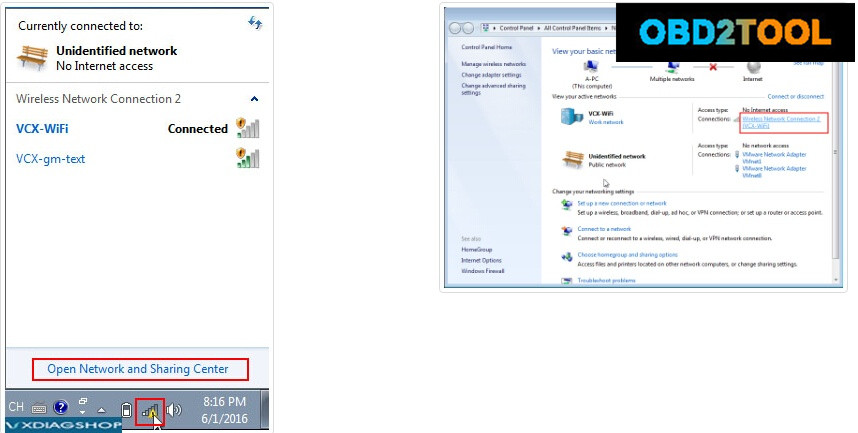
VXDIAG-Multi-Tool-Connection-Guide-13
VXDIAG-Multi-Tool-Connection-Guide-14
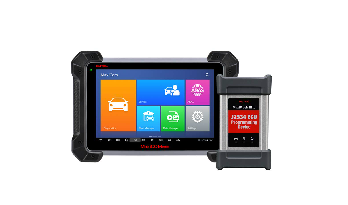
3.Start VX Manager program,select [Device],then click [Configure], Connection Type select [WLAN],click [Save]
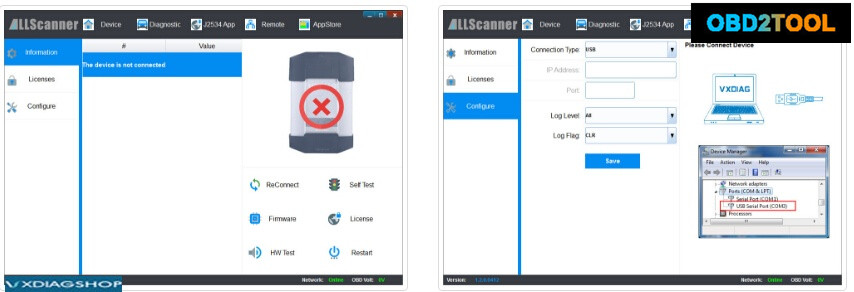
VXDIAG-Multi-Tool-Connection-Guide-15
VXDIAG-Multi-Tool-Connection-Guide-16
VXDIAG-Multi-Tool-Connection-Guide-17
4.Restart VX Manager program,computer have been connected to the device through WiFi
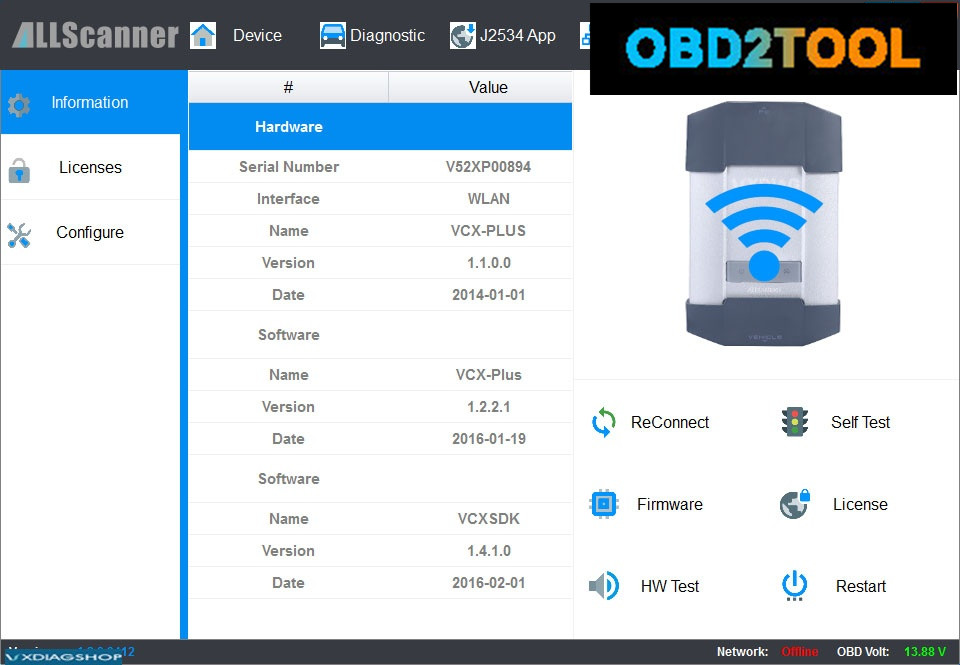
VXDIAG-Multi-Tool-Connection-Guide-18
completed

2019年8月31日星期六

Autel MaxiCoM MK908P = MaxiSys Elite?

MaxiCOM MK908P
MaxiCOM MK908P
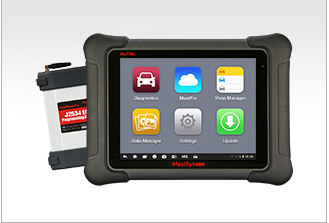
Autel MaxiCOM MK908P is a professional diagnostic tool with a 10.1-inch touch screen and advanced hardware from the Samsung Exynos Hexa-core processor and Android 4.4.2 OS for quick and comfortable car diagnostics. Offering comprehensive OE-level diagnostics, ECU coding and BMW/Benz ECU programming, the MK908P is an ideal automotive diagnostic tool for mechanics to troubleshoot the warning lights and fix the vehicle control modules’ issues.


MaxiSys Elite
Maxisys Elite
The MaxiSys Elite, the newest addition to the MaxiSys line of highly advanced smart diagnostic tools, is based on the fast and intuitive Android operating system. Powered by NVIDIA’s Tegra® 4, the world’s fastest mobile processor, its visually stunning 9.7” Retina display offers ultra-high resolutions up to 2048×1536 and an optimized array of sophisticated and powerful applications. The MaxiSys Elite rapidly performs every job from comprehensive vehicle diagnostics & analysis to advanced ECU programming. 2x faster than any comparable device, the MaxiSys Elite provides extended battery life and intelligent power saving. The MaxiSys Elite offers a super-sensitive capacitive screen able to respond to gloved, moistened, and even greasy fingers! The ergonomically angled docking station provides optimum visibility and convenient charging that eliminates power concerns.
Autel MaxiCom MK908P and Maxisys Elite is the same thing?

Answer:
Yes! they share the same functions. both are able to do diagnostic tests and ecu programming
No! they are different in hardware design, like


MaxiCOm MK908P Maxisys Elite
Processor Samsung Exynos hexa-core Processor (1.3GHz Quad-core ARM Cortex-A7 + 1.7GHz Dual-core ARM Cortex-A15) NVIDIA Tegra® 4 (4-PLUS-1 Quad-core Processor) 1.8GHz with ARM Cortex – A15 CPU
Memory 2GB RAM & 64GB On-board Memory 2GB RAM & 32GB Embedded Memory
Display 10.1-inch LED screen with 1920×1200 resolution 9.7-inch Retina display with 2048X1536 resolution & Capacitive touch screen
Connectivity Wi-Fi (802.11 a/b/g/n/ac)
USB: 2.0
BT v.2.1 + EDR
SD Card (Support up to 32GB)
HDMI
802.11a/b/g/n/ac WIFI
Version 2.1 3Mbs Bluetooth
RJ45 Ethernet Connection
3.0 USB (2.0 Compatible)
HDMI 1.4a
SD Card (Support up to 32GB)
WiFi 2.4GHZ 2.4 & 5GHz
Internal battery 15000mAh 3.8V  lithium-polymer battery 15000mAh  3.7V  lithium-polymer  battery
Power Consumption 6.5 W Max 20W
Camera (rear) 8.0 Megapixel, AF with Flashlight Rear: 8.0 Megapixel, Autofocus with Flashlight
Front: 2.0 Megapixel
Dimensions (WxHxD) 312 X 208 X 36 (mm) 309 X 225 X 35 (mm)
Weight NW: 3.26 lb. (1.48kg) NW:3.5 Ib. (1.59kg)


Moreover, they are not the same about Operating System.
MaxiCOm MK908P is AndroidTM 4.4.2, KitKat. But Maxisys Elite is Android 4.4.4 KitKat.

2019年8月20日星期二

How to set WIFI for MB SD Connect C4 C5 MB Star Diagnostic Tool?

 C4/C5 WIFI setting instruction:
1、Right click on the network icon,choose “Open Network and Sharing Center”,as the picture shows:
图片1
2、choose“Change adapter settings”
图片2
图片3
3、set wired IP
图片4
Set:
IP:172.29.127.118    Subnet mask:255.255.0.0
图片5
4、set WIFI IP address:
图片6
图片7
5、set C4/C5multiplexer WIFI connection password,first connect C4/C5 multiplexer to the car(ignition on),then connect lan cable to C4/C5 multiplexer and laptop.
图片8
Right click on the bottom right corner icon图片23choose “Administration”
图片9
图片10
In Administration menu,choose 图片24Register/configure,put 1234567890123 in the KEY:1234567890123(13 numbers),then click “Star”图片19
图片11
Click the computer icon in the lower right corner图片12,find图片13Road24h in the WIFI click “Connect”
图片14
Put the 13 digits password:1234567890123
图片15
图片16
Right click icon图片23,choose “Selection”
图片17
Disconnect the C4/C5multiplexer and lan cable,click图片18then click图片19
图片20
Appear the icon图片21in the lower right corner,then it is ok.
图片22

2019年8月2日星期五

MB STAR C4 C5 mb sd connect software has updated to 2019.07 with Super Engineering Software DTS monaco And Vediamo


Mb star c4 c5 Software list:
  1. DAS 2019.07: the automatically Diagnosis Assistance System
  2. Xentry 2019.07: New software released by Bennz Company after 04/2009 by diagnosis new cars.
  3. WIS net 2018.11:Workshop Information System
Supply the whole view of the wiring diagram in a car, component location diagram and maintenance method. What you do is to enter the chassis number, and then you will get the manufacture data, engine configuration and the car model -all in detail.
  1. EPC.net 2018.11:Electronic Parts Catalog
  2. ST Finder:Part Location Finder options: 2008 and 2016
  3. STARUTILITIES :the movement management system and self-test
  4. SD MEDIA 2014
  5. PL73
9.Engineer Software:DTS monaco V8.14.016 And Vediamo V5.01.01 Support Offline Programming
10.HHT Software for old cars
11.Engineer version Vediamo updated to V5.01.01 ,Engineer version DTS updated to V8.14.016,Upgrade to the latest version of 2019 data
1) Fix the error that Mercedes-Benz DAS cannot directly call WIS
2) Join the DAS sedan smart offline programming
3) Join the 204 DAS stand-alone version, which can be mutated (German), which is more powerful than Vediamo
4) Join DAS special function password-free access PKW and SMART
5) Repair SMART 450, 451, 452, 454 No longer need TAN Caculator, all offline
6) Increase offline EOL and VMAX all LKW, modify truck maximum speed limit
7) Lift the truck NOx TORGUE restriction, do not need FDOK XT calculation code, directly enter, directly cancel the legal speed limit, you can modify without special function
8) Clear the truck SCR/ADBLUE fault code (MR), do not need FDOK XN calculation code, enter directly
9)Add DAS 212,207 prototyp model

MB SD Connect C4 C5 Feather:
1.Support Wireless
2.Xentry Software Version:2019.07
3.Hardware Verison:OS:2.3   CSD:2.11
4.Supported Multi-Language: Deutsch, English, Französisch, Italienisch, Spanien, Portugal, Finnland, Dänemark, Schweden and so on.
5.Including Super Engineer Software:DTS monaco V8.14.016 And Vediamo V5.01.01
6.Support Offline Programming

Basic programming set code function:
1.unit for off-line programming
2.a key to off-set code
3.W166, cancel the programmed number of calculation method of urea, one perfect canceled all 166 urea system.
The new c s-series to the factory installed conversion:
4.222, 205 installing fragrance systems
5.2015, paragraph 212, changing traffic light permanently lit
6.212, 204, adding electric ear
7.222 205 HU5 traffic solution for DVD video
8.W164 closed recycling system
9.W205, retro atmosphere lamp
10.205, 222 adding electric ear electric trunk, the trunk kicking function
11.166, how to modify the gateway set up codes
12.166 meters finished degrees Fahrenheit to degrees Celsius
13.US standard maintenance mileage be set to the number of miles
14.164 disabled diesel particle filter regeneration system
15.166 canceled urea
16.205 added electric rear vision mirror
17.HU45 regional Chinese resolve lock
18.W204 W166 foldable rear-view mirror
19.change the 166 on board, display in Celsius
20.W212 disable ECO configurations
21.activate the HOLD function ABR2XT
22.open W22 looked up appears
23.the AMG sports package enabled W212
24.the air bag computer reset factory State W166
25.to increase the brightness of the color instrument cluster s W222
26.22.97g to install the steering wheel shift paddles
27.W221 AMG W216 dashboard style
28.airbag ECU unlock W204 212
29.disabled child seat recognition sensors W221
30.opening rear fog lamps as spare brake lights with W222
31.increasing engine power MED177

Mb star Software display:
1
2
10
11

12

3
4
5
7
8

9

7