显示标签为“OBDSTAR X300M+”的博文。显示所有博文

2019年3月25日星期一

Digiprog 3 vs OBDSTAR X300M ,Which better

Digiprog 3 vs OBDSTAR X300M will made in this article,i belive,it will help buyers who are looking for a great but costive obd 2 odometer adjust tool in the marketplace.So,let’s start now !
Digiprog 3 Odometer Correction Tool Introduction
Digiprog 3 Digiprog3 is a cheap affordable but with top quality OBDII Odometer Correction Tool. Digiprog 3 can be connected with dashboard or OBDII to provide a full diagnostic for full range or vehicle with multi-languages optional.
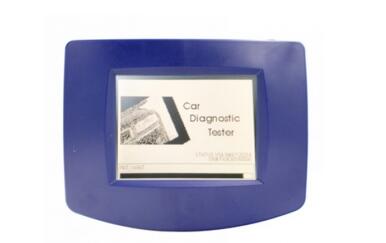
Digiprog-3
OBDSTAR X300 M Introduction
X300M was designed by OBDSTAR,it is a original product that specially for Odometer Correction supporting for univeral cars.OBDSTAR X300M is handheld,lightweight but top quality ,and supports free update for 1 year.
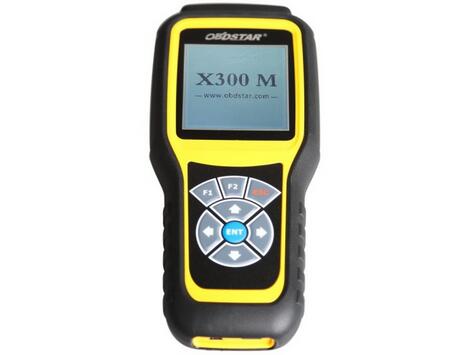
OBDSTAR-X300M
Digiprog 3 vs OBDSTAR X300 M
The Same
1.Supports Odometer Correction functions.
2.Coverage Multi car Models.
3.Connected by OBD2 port.
The Different
1.OBDSTAR X300 M only support English,but Digiprog 3 supports English,German,Spanish , French, Portuguese, Italian, Turkish, Dutch.
2.OBDSTAR X300M Odometer Correction Tool supports has free update for 1 year,while Digipro 3 was updated by sending the main unit back to the facotry.
3.Digiprog 3 DP3 Chang km via OBD,or chip,cluster & BCM,Tacho & BSI,Micro,EWS,etc,while the X300M change km via OBD only.
4.Digiprog 3 supports cars,some Trucks & Motorcycles,the X300 M only for cars.
5.OBDSTAR X300 M do better than Digipro III Digipro 3 DP3 in terms of new cars supporting.
6.Digiprog III is cheaper than X300M.
So,For me,i will give my first choice to Digiprog 3 DP3 ,no matter in terms of features,performance,functions as well as price, Digiprog 3 was a ideal choice.And this tool has been tested by many users with a good reputation.
But if you wanna a tool for new software updating as well as new car models supported,then choose X300M is for you,is handheld and performance is stable.

2017年7月28日星期五

OBDSTAR X300M change KM on Porsche Cayenne 2008

In this article OBD2TOOL enginner will share the experience of how to change KM on Porsche Cayenne 2008 by OBDSTAR X300M Mileage Programmer.
The device you need: OBDSTAR X300 Odometer Adjustment Tool.
X300M Change KM for Cayenne 2008 Procedure(Below picture show the mileage before adjusting 234574km )
STEP 1: Connect OBDSTAR X300M OBDII Vehicle Correction to your Porsche and Power on the programmer.
http://forobd2tool.com/wp-content/uploads/2017/07/1/9-1.jpg
STEP 2: Select VEHICLES->MILEAGE ADJUSTMENT->PORSCHE->PORSCHE V30.12
http://forobd2tool.com/wp-content/uploads/2017/07/1/9-2.jpg
http://forobd2tool.com/wp-content/uploads/2017/07/1/9-3.jpg
http://forobd2tool.com/wp-content/uploads/2017/07/1/9-4.jpg
http://forobd2tool.com/wp-content/uploads/2017/07/1/9-5.jpg
STEP 3:Screen display “initializing…”–>”authorizing…”
Select Cayenne->Cayenne-2009->MILEAGE ADJUSTMENT
http://forobd2tool.com/wp-content/uploads/2017/07/1/9-6.jpg
http://forobd2tool.com/wp-content/uploads/2017/07/1/9-7.jpg
http://forobd2tool.com/wp-content/uploads/2017/07/1/9-8.jpg
STEP 4:Screen display”communication…”–>enter a filename to save,here input 11100000
OBDSTAR X300M managed to read the curent mileage(error does not exceed 10km)
http://forobd2tool.com/wp-content/uploads/2017/07/1/9-9.jpg
http://forobd2tool.com/wp-content/uploads/2017/07/1/9-10.jpg
STEP 5:Input new mileage 345430
http://forobd2tool.com/wp-content/uploads/2017/07/1/9-11.jpg
http://forobd2tool.com/wp-content/uploads/2017/07/1/9-12.jpg
STEP 6:Screen dispaly”adjusting mileage…”,then adjustment complete.
http://forobd2tool.com/wp-content/uploads/2017/07/1/9-13.jpg
http://forobd2tool.com/wp-content/uploads/2017/07/1/9-14.jpg
Finish,the dashboard displays the new mileage as what is set just now.
http://forobd2tool.com/wp-content/uploads/2017/07/1/9-15.jpg


http://cheapobd2scanner.com/2017/07/25/obdstar-x300m-change-km-on-porsche-cayenne-2008/